Problem: Can't get rid of Research pane in Word
Tip from MS forum helped; press ALT R R
(yes, that is double R)
All Word toolbars will appear activated (display shortcuts), but annoying pane is removed this way.
October 07, 2017


July 12, 2015
ProgDVB doesn't show subtitles
Problem: Icon for subtitles is turned on, yet there are no subtitles displayed
Numerical values for subtitles display are set to low.
To correct this, go to:
Settings - options -Subtitles & OSD -
button under Subtitles -
values should be something like this:
5 - 399 - 633 - 150
See the pic below and notice a black border surrounding the example text for subtitles.
Black border must cover all text inside, otherwise it won't be shown.
With TV5 Monde and African, Indian TV now equipped with English subtitles, Rai TV with Italian for learners,etc etc.. it would be shame not to take use of subtitles and see the satellite TV world in full.

Numerical values for subtitles display are set to low.
To correct this, go to:
Settings - options -Subtitles & OSD -
button under Subtitles -
values should be something like this:
5 - 399 - 633 - 150
See the pic below and notice a black border surrounding the example text for subtitles.
Black border must cover all text inside, otherwise it won't be shown.
With TV5 Monde and African, Indian TV now equipped with English subtitles, Rai TV with Italian for learners,etc etc.. it would be shame not to take use of subtitles and see the satellite TV world in full.

December 13, 2013
Partial print of PDF document
Problem: Only part of PDF document is printed although it's A4
In print option, "Choose paper source by PDF page size" should be unchecked.

In print option, "Choose paper source by PDF page size" should be unchecked.

November 29, 2013
Excel 2010 crashes when a box above the cells is clicked
Problem: Excel has "not responding" error when check/text box is clicked
I opened that same document in Libre office, saved it, then when it's opened again as Microsoft Office-
the box was gone by itself, and no more crashes.

I opened that same document in Libre office, saved it, then when it's opened again as Microsoft Office-
the box was gone by itself, and no more crashes.
October 27, 2013
Printed documents turns out as distorted hard copy
Problem: Printed documents are only fragments of original sent document, they turn out to be partly printed, magnified and distorted in hard copy
Problem was in printer settings for paper size/Orientation -
it was set to print in landscape even though the document was in portrait.

Problem was in printer settings for paper size/Orientation -
it was set to print in landscape even though the document was in portrait.

September 24, 2013
Sum values only those which are not hidden
Problem: Sum function sums all values, even though some are not visible (hidden) in Excel
How to sum only visible values - not to include hidden ones -
the instructions for Excel says to use SUBTOTAL instead of SUM and number 9 or 109 in front of the range, like this;
In Croatian system this doesn't work,
there should be ; instead of ,
and number 109;
How to sum only visible values - not to include hidden ones -
the instructions for Excel says to use SUBTOTAL instead of SUM and number 9 or 109 in front of the range, like this;
=SUBTOTAL(9,D6:D82)
In Croatian system this doesn't work,
there should be ; instead of ,
and number 109;
=SUBTOTAL(109; A1:A5)
August 20, 2013
Adobe Flash can't be installed
Problem: Adobe Flash installation hangs in Task manager
Some web sites suggest this is due to antivirus/malware software. The PC with this problem didn't have any antivirus/malware software at all.
Solution was to download and run full Adobe Flash installation:
http://www.adobe.com/products/flashplayer/distribution3.html
Some web sites suggest this is due to antivirus/malware software. The PC with this problem didn't have any antivirus/malware software at all.
Solution was to download and run full Adobe Flash installation:
http://www.adobe.com/products/flashplayer/distribution3.html
August 19, 2013
Remote desktop shortcut
Problem: How to quickly open Remote Desktop Connection
Windows button + R
mstsc - OK

Windows button + R
mstsc - OK

August 13, 2013
Excel 2003-2007-2010 crashes when opening up
Problem: Excel document opens only after recovery
This problem is connected with previous post:
http://pcproblemi.blogspot.com/2009/04/excel-20032007-crash-during-closing.html
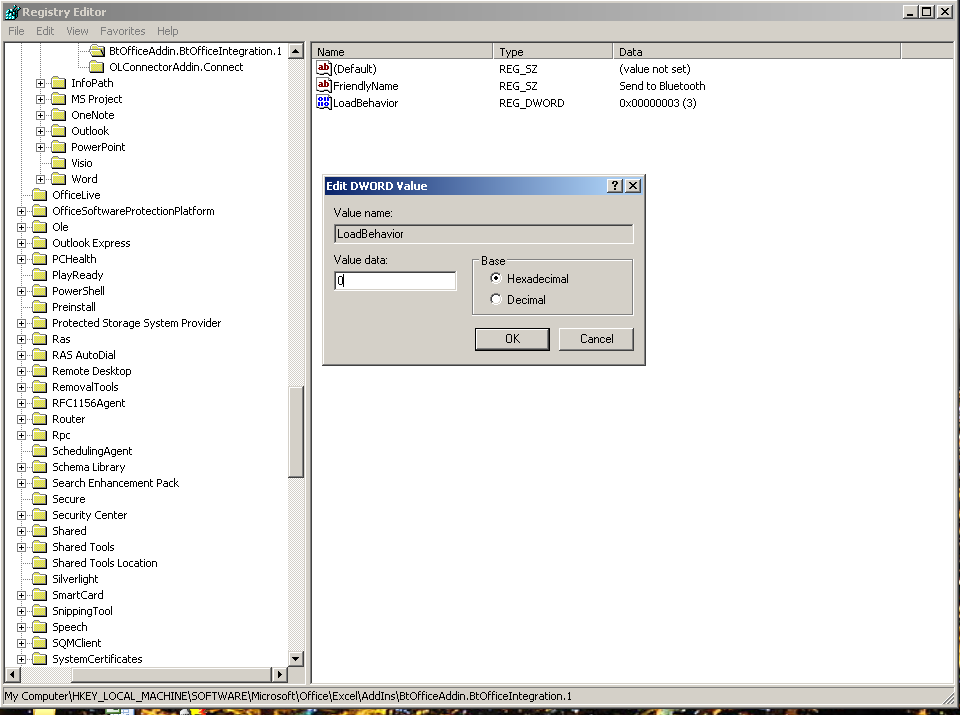
The same solution helped - in registry:
HKEY_LOCAL_MACHINE\SOFTWARE\Microsoft\Office\Excel\Addins
BtOfficeAddin.NtOfficeIntegration.1
was to 3, it should be 0:
LoadBehavior from 3 to 0
Excel works fine when opening as new document, however if old documents are opened - they crash immediately.

This problem is connected with previous post:
http://pcproblemi.blogspot.com/2009/04/excel-20032007-crash-during-closing.html
The same solution helped - in registry:
HKEY_LOCAL_MACHINE\SOFTWARE\Microsoft\Office\Excel\Addins
BtOfficeAddin.NtOfficeIntegration.1
was to 3, it should be 0:
LoadBehavior from 3 to 0
Excel works fine when opening as new document, however if old documents are opened - they crash immediately.
August 12, 2013
Problem: Excel cannot be added through Object option in Word
There is an error:
"The program used to create this object is Excel. That program is either not installed on your computer or is not responding. To edit this object, intall Excel or ensure that any dialog boxes in Excel are closed."
Excel document was opened - once it was closed, it could be inserted into Word as Object (no dialog boxes as suggested).

There is an error:
"The program used to create this object is Excel. That program is either not installed on your computer or is not responding. To edit this object, intall Excel or ensure that any dialog boxes in Excel are closed."
Excel document was opened - once it was closed, it could be inserted into Word as Object (no dialog boxes as suggested).

August 02, 2013
Drivers for Panasonic s3065c
Problem: Where to find Windows 7 64-bit drivers for Panasonic scanner s3065c?
http://panasonic.net/pcc/support/scanner/download.html
RTIV and basic drivers are enough:
panascan5606
rtiv57025_all_package
http://panasonic.net/pcc/support/scanner/download.html
RTIV and basic drivers are enough:
panascan5606
rtiv57025_all_package
July 15, 2013
This command is not available in a shared workbook.
Problem: Copy - paste image is not allowed in Excel 2003
Also, at the name of document, there is [Shared] label,
To remove it and thus allow copy-paste:
Tools - Share Workbook - remove check box 'Allow changes..'- confirm with yes.


Also, at the name of document, there is [Shared] label,
To remove it and thus allow copy-paste:
Tools - Share Workbook - remove check box 'Allow changes..'- confirm with yes.


July 11, 2013
An extension failed to initialize
Problem: This error occurs when opening Outlook 2003
extended.dat must be renamed into extended.old
File is in this location:
C:\Documents and Settings\username\Local Settings\Application Data\Microsoft\Outlook

extended.dat must be renamed into extended.old
File is in this location:
C:\Documents and Settings\username\Local Settings\Application Data\Microsoft\Outlook
June 26, 2013
Status message at startup trying to instal itself
Problem: After repairing Windows XP there is Status error message in loop
It was caused by HP software
HP Deskjet F4200 All-in-one DriverSoftware 11.0 Rel.3
Once uninstalled, the message was gone.

It was caused by HP software
HP Deskjet F4200 All-in-one DriverSoftware 11.0 Rel.3
Once uninstalled, the message was gone.

Paste special is not showing standard features
Problem: Copy-paste in excel doesn't show paste special for formatting
On the internet, it is said that skype is causing this, and that browsers should be closed, with add-in for skype disabled :
in this case, skype was not installed on user's PC. So immediate solution was to close Mozilla and IE -
and copy - paste worked ok.

On the internet, it is said that skype is causing this, and that browsers should be closed, with add-in for skype disabled :
in this case, skype was not installed on user's PC. So immediate solution was to close Mozilla and IE -
and copy - paste worked ok.

Mail merge items show various decimal points, only 2 are needed
Problem: In Excel, mail merge option inserts decimal points with 0,xx and 0,xxxxxxx format and user wants only 0,xx
This web page helped:
Changing How Word Displays Numbers in Mail Merge
http://wordprocessing.about.com/od/usingmailmerge/qt/NPFSwitch.htm
the best solution is to include a switch in the merge field.
\#
Example:
{MERGEFIELD "Iznos"\#--0,00x }
This web page helped:
Changing How Word Displays Numbers in Mail Merge
http://wordprocessing.about.com/od/usingmailmerge/qt/NPFSwitch.htm
the best solution is to include a switch in the merge field.
\#
Example:
{MERGEFIELD "Iznos"\#--0,00x }
June 07, 2013
Page numbering in Word 2010
Problem: Insert - Page number options does not insert solely page number, it adds format header as well
(Thanks to Tomi):
Insert - Page Number - Current Position
http://office.microsoft.com/en-001/word-help/add-or-remove-headers-footers-and-page-numbers-HA010372690.aspx
However if that doesn't work, to insert only page number, go to;
Insert tab - Quick Parts - Field
Page
NumPages is total number of pages.

(Thanks to Tomi):
Insert - Page Number - Current Position
http://office.microsoft.com/en-001/word-help/add-or-remove-headers-footers-and-page-numbers-HA010372690.aspx
However if that doesn't work, to insert only page number, go to;
Insert tab - Quick Parts - Field
Page
NumPages is total number of pages.

May 14, 2013
Office 2003 installation on your computer is corrupted
Problem: Removing Office 2003 and installing 2010 produces error
Consequently, Office 2010 can't be installed.
Registry solved this problem;
run - cmd - regedit:
HKEY_CURRENT_USER\Software\Microsoft\Office
HKEY_LOCAL_MACHINE\Software\Microsoft\Office
To:
HKEY_CURRENT_USER\Software\Microsoft\xOffice
HKEY_LOCAL_MACHINE\Software\Microsoft\xOffice
http://community.office365.com/en-us/forums/172/t/8334.aspx

Consequently, Office 2010 can't be installed.
Registry solved this problem;
run - cmd - regedit:
HKEY_CURRENT_USER\Software\Microsoft\Office
HKEY_LOCAL_MACHINE\Software\Microsoft\Office
To:
HKEY_CURRENT_USER\Software\Microsoft\xOffice
HKEY_LOCAL_MACHINE\Software\Microsoft\xOffice
http://community.office365.com/en-us/forums/172/t/8334.aspx

May 07, 2013
No text when forwarding mail
Problem: In Outlook 2003 there is no message body when forwarding
User had local folder with messages - when opened from this location there is message text, however when user tries to reply or forward, there is no body message.
All mails located in Outlook worked fine when forwarding.
It didn't help to set filtering none:
Tools, Options, General Tab, Email Options... ( button), General Tab "Html Options" > HTML filtering Options: - Select "none"
https://getsatisfaction.com/mozilla_messaging/topics/forward_message_message_body_text_missing
Also it didn't help to set automatic colour font, nor removing add-ins.
Workaround that helped was to drag e-mails from folder back to outlook folder,
then it worked - message appeared when hitting forward (or reply).

User had local folder with messages - when opened from this location there is message text, however when user tries to reply or forward, there is no body message.
All mails located in Outlook worked fine when forwarding.
It didn't help to set filtering none:
Tools, Options, General Tab, Email Options... ( button), General Tab "Html Options" > HTML filtering Options: - Select "none"
https://getsatisfaction.com/mozilla_messaging/topics/forward_message_message_body_text_missing
Also it didn't help to set automatic colour font, nor removing add-ins.
Workaround that helped was to drag e-mails from folder back to outlook folder,
then it worked - message appeared when hitting forward (or reply).

May 02, 2013
Default location for Windows Explorer
Problem: How to set up new location when opening Explorer shortcut?
Find Windows Explorer in Accessories, right click Properties,
Target:
add space and address to folder you'd like to be opened - instead of Libraries.
http://www.pcworld.com/article/239258/win_ex_default.html
Find Windows Explorer in Accessories, right click Properties,
Target:
add space and address to folder you'd like to be opened - instead of Libraries.
http://www.pcworld.com/article/239258/win_ex_default.html
Subscribe to:
Posts (Atom)