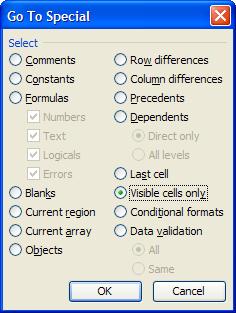
Problem: How to paste only cells as seen on screen, hidden must stay hidden
In Office 2003:
press F5
Go to -
Special -
Visible Cells only
OK -
copy


Error: "Your current security settings prohibit running ActiveX..."
This helped:
http://support.microsoft.com/kb/907343
Tools menu, click Options, click the Interface -
clear check box
Display Project Guide
Problem: Printed message from outlook shows only header on hard copy
Solution proposed by yahoo didn't work (to find and delete OUTLPRNT file,
http://answers.yahoo.com/question/index?qid=20090113142826AAQuLjk
It helped to instal IE8 (IE7 was instaled - IE7 was the source of problem).



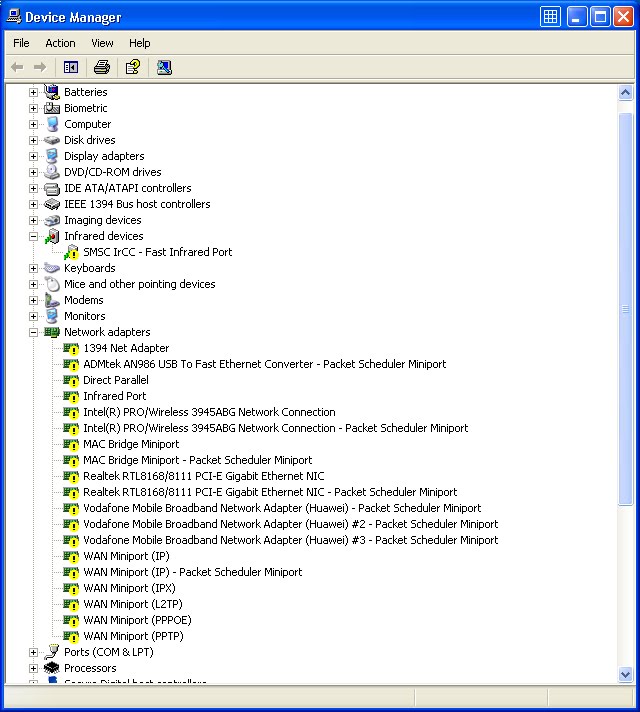

[HKEY_LOCAL_MACHINE\SYSTEM\CurrentControlSet\Services\NDIS]
"DisplayName"="NDIS System Driver"
"ErrorControl"=dword:00000001
"Group"="NDIS Wrapper"
"Start"=dword:00000000
"Type"=dword:00000001
[HKEY_LOCAL_MACHINE\SYSTEM\CurrentControlSet\Services\NDIS\MediaTypes]
[HKEY_LOCAL_MACHINE\SYSTEM\CurrentControlSet\Services\NDIS\Parameters]
"ProcessorAffinityMask"=dword:ffffffff
[HKEY_LOCAL_MACHINE\SYSTEM\CurrentControlSet\Services\NDIS\Enum]
"0"="Root\\LEGACY_NDIS\\0000"
"Count"=dword:00000001
"NextInstance"=dword:00000001
[HKEY_LOCAL_MACHINE\SYSTEM\CurrentControlSet\Enum\Root\LEGACY_NDIS]
"NextInstance"=dword:00000001


Real easy. The left side cover needs to come off and you just pry it off from the back using a flat tip screwdriver and then out. Remove the 3 connectors and 2 ribbon connectors to the board and remove the 4 screws and remove the board. Remove the black tape piece that covers some items by the dimm slot. Prop up on the 4 corners so the board does not touch anything with the chips facing up and put in baking pan and place in oven preheated to 350 F and keep in over for 8 minutes. Remove a let cool for about 30 minutes and put back together and it should work just fine.(350F=176C)


Problem: Copy, paste, device manager do not work, there is error message not allowing it
Even though administrator is logged in.
Solution is here:
http://www.vistahelp.ca/phpBB2/viewtopic.php?t=543&sid=6f0880301c7d67caea8b2398fd2faeed
There is a program Take Ownership, which after is run allows administrator to right click drive C and replace in Security tab current owner (which was nobody) into administrator:


Problem: There is an error message when clicking hyperlink
Internet explorer wasn't default browser.
Internet Properties
Programs - Make default

Problem: Classic view in Control panel can't be set
Start - Run - gpedit.msc
Local Computer Policy - User Configuration -
Administrative Templates
Control Panel
Force classic Control Panel = enabled

Problem: Regional settings are not saved, IE reports error for search provider
The user was created as "Temp" in documents and settings.
Once the new profile was created, keyboard settings were saved and IE worked ok.
Creating the new profile is the only advice on the net for saving keyboard settings,
tweaks didn't help.
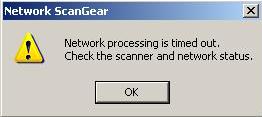
Problem: Some users cannot ping and access status to network scanner (iR3300)
The cause of problem was network switch - once it was restarted (unplugged from the power and re-plugged) it worked ok. Scanner and the other user are connected to the switch. PC which was not connected to the switch worked with scanner OK the whole time.


